What app makes those Smalltown Boy AI dance videos?
Compare Smalltown Boy AI, CapCut, Viggle, and Runway, and choose the right app to make a dance video from photos, a motion reference, or existing footage.
Not every “scream, swap, then dance” clip comes from the same app. It may be an edit, a motion-transfer remix, or a prompted video. If you want the recognisable two-character version from your own photos, a dedicated generator is the shortest route: upload one duo photo or two portraits, set the opening role, and generate the preset without filming or writing choreography.
Make your Smalltown Boy AI video from photos →
Which App Should You Use for a Smalltown Boy AI Video?
The practical question is not “Which app is best?” It is what do you already have, and how much of the dance do you want to control? A finished clip, a reference dance, two portraits, and an original visual idea are different starting points.
| Tool | Best for | What you need | Key limitation |
|---|---|---|---|
| Smalltown Boy AI | Recreating the fixed scream-and-swap routine | Two portraits or one clear duo photo | The dance, format, and soundtrack are preset |
| CapCut | Editing recorded footage or using a template | Clips or photos that fit the template | A template is not automatically a two-photo AI dance generator |
| Viggle AI | Making a character follow a chosen dance | A character image plus a template or motion clip | You still need to choose or supply the movement source |
| Runway Gen-4.5 | Directing an original short scene | An image, a motion prompt, and iteration | It is not built around this exact meme routine |
The tools are not interchangeable. A template can be quick without creating a new performance from two still photos. Start with the route that matches your inputs.
Four Ways to Make the Video
1. Use a dedicated Smalltown Boy AI generator when the routine is the point
Choose this route when you have two clear portraits—or one photo that already contains both characters—and want the familiar close-up, role swap, and shared dance without building the sequence yourself.
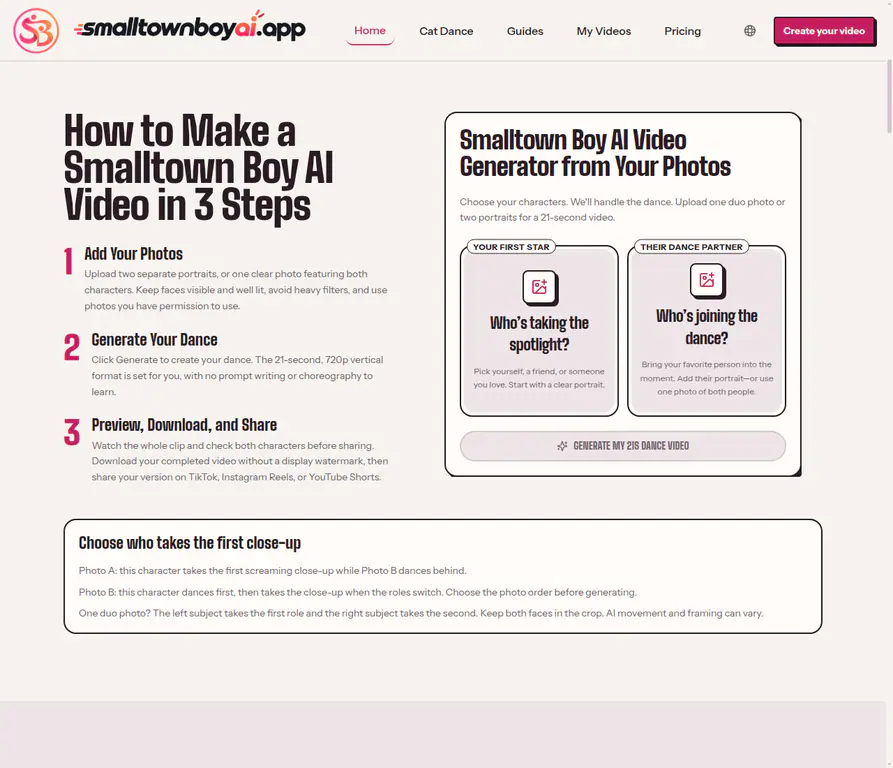
Smalltown Boy AI accepts two separate portraits or one duo photo. With separate files, Photo A gets the first close-up and Photo B begins in the background. With a shared image, the left subject opens and the right subject follows. The generator creates a preset 21-second, 720p vertical video with a fixed soundtrack. There is no dance-reference upload or text prompt to write.
That convenience is also the boundary. Use it for the recognisable format, not when you need your own choreography, camera language, or storyline. Generated movement, likeness, framing, and anatomy can vary, so preview the whole clip before sharing it.
2. Use CapCut when you are editing, not asking AI to stage the performance
CapCut is the sensible pick when you already have a video to cut, captions to add, audio to change, or a template whose required clips match your material. Its template guidance describes replacing sample photos or videos and adjusting timing, text, music, effects, and transitions. That is useful after you have filmed a dance—or generated one elsewhere and want to package it for a post.
Do not assume that any template labelled “Smalltown Boy” recreates this current meme. A template with the same song name may be an unrelated edit, and a photo template does not necessarily create a two-person performance from static portraits.
3. Use Viggle when you want a character to follow a particular dance
Viggle is a motion-transfer route. You upload a character image and select a dance template or provide a reference clip; the service maps the movement onto that character. Choose it when the choreography is your creative decision.
Before generating, you need a usable dance and an image with enough body information to animate. That gives you more freedom than a preset, but it is not a one-click promise to reproduce the Smalltown Boy role swap.
4. Use Runway when you want to direct an original short scene
Runway’s Gen-4.5 image-to-video workflow combines an image with a text prompt and supports two- to ten-second clips. It is valuable for a specific camera move, a stylised setting, or a brief original dance shot.
It also changes the work: you will write and revise prompts, choose a duration, and often combine several generations for a multi-beat idea. That is worthwhile for an original concept. It is unnecessary overhead if all you want is the specific 21-second scream-and-swap routine from two photos.
How to Make the Smalltown Boy AI Dance with Two Photos
A dedicated workflow is short because the choreography is already built in.
- Choose the input format. Use two portraits when you want direct control over the opening role. Use one duo photo only when exactly two subjects are clear and easy to distinguish.
- Set the first close-up. With two portraits, Photo A goes first. In a shared photo, the subject on the left goes first.
- Generate, then watch all 21 seconds. Check both close-ups, the swap, and the shared dance for identity drift, merged bodies, or changed details.
Clear faces, visible upper bodies, natural light, and similarly scaled crops give the generator a better starting point. For input selection help, read how to choose the best photos for Smalltown Boy AI. For the complete upload and review process, use the step-by-step Smalltown Boy AI tutorial.
Which App Is Best for Your Situation?
| If you want to… | Start with… |
|---|---|
| Turn two photos into the fixed scream-and-swap dance | Smalltown Boy AI |
| Edit a video you have already filmed or add captions and timing changes | CapCut |
| Make a character imitate a specific dance-reference video | Viggle |
| Build an original scene with prompt-led motion and camera direction | Runway |
| Make two pets perform the same preset routine | Smalltown Boy Cat Dance |
The fastest choice is usually the one that removes the steps you do not want to perform. If prompt writing, references, and an editing timeline are not part of the fun, use the preset. If they are the creative part, choose the more open tool.
Do You Need CapCut, a Prompt, or a Reference Video?
Not for the dedicated Smalltown Boy AI route. CapCut is optional post-production, not a prerequisite. A prompt is not needed because the routine is preset. A reference video is not needed because the motion is already built in.
Those statements are specific to this workflow. Viggle is built around a template or motion reference. Runway uses a prompt for image-to-video generation. Keeping the distinction clear prevents an unnecessary setup task—or disappointment when a general AI tool creates a different dance.
FAQ
What app makes the viral Smalltown Boy screaming dance?
There is no single app behind every clip. Some posts are edits, some are motion-transfer remixes, and some are prompt-based AI videos. For the fixed two-character scream-and-swap routine made from photos, use a dedicated Smalltown Boy AI generator.
Can I make a Smalltown Boy AI video without filming myself?
Yes. Upload two portraits or one clear duo photo, set the opening role, and generate the preset. You do not need to record yourself dancing first.
Is there a free Smalltown Boy AI video app?
Do not confuse a free trial somewhere in the AI-video market with a permanently free version of this workflow. Smalltown Boy AI uses one-time video packs, not a recurring subscription. Its current starter display is $9.90 for one standard 21-second video; larger packs reduce the per-video price. Check the live generator before paying because offers can change.
Can I make the dance with cats or dogs?
Yes. Use sharp photos that show faces, markings, and enough of the body to tell the animals apart, then review the completed video for changed fur patterns or anatomy artifacts.
Do these apps include the “Smalltown Boy” song?
Audio handling differs by tool. Smalltown Boy AI includes a fixed soundtrack in its preset, but that does not establish that every tool includes the original recording or that you have broad commercial music rights. Check the platform and account rules before publishing.
Two photos plus the exact meme routine means use the dedicated generator; a pre-existing video means use an editor; chosen choreography means use motion transfer; an original visual idea means use a prompt-led video tool.