

Smalltown Boy AI Prompt: Copyable Examples and Model Settings
Copy Smalltown Boy AI prompts for cats and pets, compare reference edits with image-to-video, and configure Seedance 2.5 or Runway Gen-4.5.
A Smalltown Boy AI prompt has to do more than ask two characters to dance. It needs to tell the model who each character is, which performer they follow, and where the movement comes from. Without those distinctions, you may get an entertaining dance that misses the close-up, role swap, and shared finale that make this version of the trend recognizable.
For a reference-based Smalltown Boy remix, use two character images and a permitted dance video, bind each image to one source performer, and specify which parts of the reference to preserve. For ordinary image-to-video, start from one image containing both characters and describe a shorter, simpler sequence. These are different workflows; the same prompt and settings will not transfer unchanged between them.
Below are two publicly published, copyable prompts, a Seedance-specific editing adaptation, and a simpler image-to-video version. The configurations are checked against official documentation. The visual example is a published third-party demonstration, not a controlled test of these prompts or a claim that one model produces better results than another.
Copyable Smalltown Boy AI prompts
The first two examples appear in the published Smalltown Boy reference-workflow guide. They describe two character images plus one motion reference, not a text-only generation.
Before pasting either prompt, attach the actual assets:
- Image 1: the first replacement character.
- Image 2: the second replacement character.
- Video 1: the dance segment you have permission to use.
The @Image1, @Image2, and @Video1 labels below identify those attachments. They are not universal upload commands. Use your tool’s actual asset labels or reference selector; typing the labels without attaching the files does not give the model access to your photos or video. BytePlus’s official examples use labels such as @Image 1, with a space.
Prompt 1: Two dancing cats
Use this with: a mode that supports two identity images and a reference video. It is a published prompt, reproduced as written—not a tested guarantee of identity or anatomy preservation.
Recreate the selected dance segment in @Video1 with two cats. @Image1 replaces the dancer on the left at the beginning; @Image2 replaces the dancer on the right. Track those performers throughout, even if their screen positions change. SAME IDENTITY: preserve each cat's face, eyes, ear shape, fur color, markings, coat texture, and recognizable body features. Follow the corresponding dancer's action sequence, expressions, head movements, body sways, paw gestures, hind-leg steps, pauses, and timing. Animate upright feline dancers with feline paws, adapting the reference movement to their proportions without adding human hands. Preserve the background, lighting, camera angles, movement, framing, and cut order from @Video1. Keep both cats separate, balanced, and grounded. NO DUPLICATE, no identity swaps, original-performer reappearance, fused bodies, extra limbs, changing fur patterns, or foot sliding. NO NEW SCENES. Match the selected duration; use 9:16 if both cats fit the frame. Add music separately.
The useful part is the identity assignment, not the capital letters. One cat follows one source performer through the clip, including after the performers change places. The appearance instructions then identify what makes each cat recognizable: its eyes, ears, coat, and markings.
If your reference opens with one performer in front and another behind, rather than an unambiguous left/right arrangement, adjust that assignment before generating. For example: “Image 1 replaces the performer taking the first close-up; Image 2 replaces the performer initially dancing in the background.” Keep those assignments for the rest of the sequence.
Prompt 2: A cat-and-dog duo
Use this with: the same two-image, one-video reference workflow. This is also a published prompt, reproduced as written.
Recast the two dancers in @Video1 with my cat from @Image1 and my dog from @Image2. The cat follows the opening left dancer; the dog follows the opening right dancer throughout the clip, regardless of later screen position. SAME IDENTITY: preserve the cat's facial features, fur markings, eyes, ears, and tail; preserve the dog's breed characteristics, muzzle, ear shape, coat color, markings, and body shape. Follow each corresponding dancer's exact gestures, head movements, expressions, steps, body sways, interactions, and timing. Animate both pets upright on their hind legs with species-appropriate front paws, adapting movement without changing their species or adding human hands. Keep the reference scene, light, camera movement, framing, and shot sequence. Maintain distinct bodies, consistent scale, believable balance, and stable floor contact. NO DUPLICATE, no pet swaps, fused limbs, extra animals, coat flicker, or new choreography. NO NEW SCENES. Match the reference segment and supported crop; add the soundtrack separately.
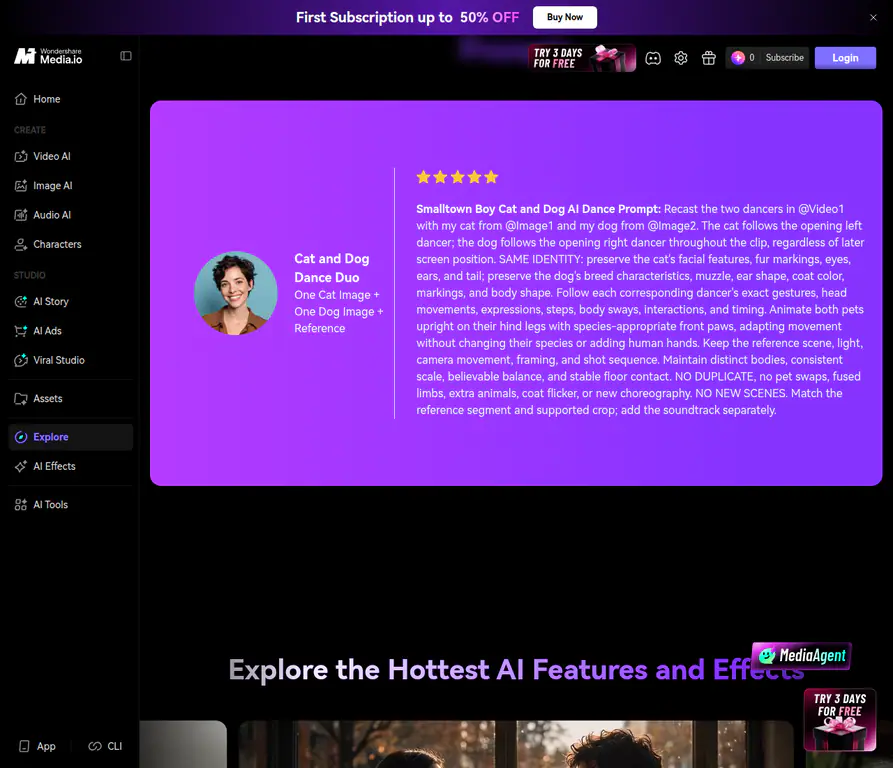
The two images define different characters; the video supplies the movement and scene sequence.
A mixed-species version needs more than changing “two cats” to “cat and dog.” The cat’s ears and coat pattern may carry its identity, while the dog’s muzzle, breed features, and body shape matter more. The prompt also asks for movement adapted to each species rather than human hands appearing on an animal.
Words such as “exact” describe the desired result. They do not establish that the model will reproduce the choreography exactly. Check the output rather than treating the prompt as proof.
Prompt 3: A Seedance 2.5 character-replacement edit
The following is an editor-written adaptation for the video-editing mode described later. It uses first-close-up and background roles instead of assuming that the opening frame has a clear left and right dancer.
Edit @Video 1 by replacing its two performers with the pets in @Image 1 and @Image 2.

The pet in @Image 1 replaces the performer who takes the first foreground close-up. The pet in @Image 2 replaces the performer initially dancing in the background. Track each assigned performer across the role switch and all later shots.

Preserve the source video's setting, lighting, camera movement, shot order, action timing, and interactions. Use the images for the replacement pets' faces, ears, coat colors, markings, and body features. Adapt the movements to their proportions, with species-appropriate paws and coherent limbs.

Keep both characters distinct. In solo close-ups, show the pet assigned to that performer. In shared shots, maintain their separate identities and stable contact with the ground. Preserve the original sequence rather than introducing another dance or setting.
This version deliberately says “Edit … by replacing”. In Seedance 2.5, editing an existing clip and generating a new clip inspired by references have different parameter rules. Do not pair this editing prompt with arbitrary fixed-duration settings and assume the API will accept it.
Use reference assets allowed by the provider. In particular, direct BytePlus access has restrictions on reference images and videos containing real human faces; the portrait-asset route is explained below. A pet replacement prompt does not remove restrictions that apply to the original video’s performers.
Prompt 4: A simpler image-to-video version without a dance reference
Use this when your selected model accepts one starting image plus text, rather than a reference video. Prepare a starting image with both characters already in the intended scene. This is an editor-written motion prompt, not a published Smalltown Boy benchmark.
The character initially on the left steps toward the camera and raises both paws beside its head with an exaggerated open-mouth expression. The other character sways in the background. The first character steps back as the second moves forward and repeats the gesture. Both then stand side by side and sway their bodies while alternating small steps. The camera moves backward enough to keep both characters visible. Playful, energetic movement in one continuous shot.
This asks the model to invent a short performance from described actions. It does not supply the original choreography, camera cuts, or musical timing. Treat it as a Smalltown Boy-inspired variation, not an exact reference recreation.
If the full sequence is too much for one generation, start with only the first foreground/background interaction. Once that works, add the role switch or generate a continuation. A shorter prompt with a manageable action can be more useful than an overloaded description of the entire routine.
Why a reference video changes the result
“Make two cats dance to Smalltown Boy” gives the model a theme, but leaves almost everything else open. It does not specify which cat takes the first close-up, what the second does behind it, when they exchange roles, or how the shared dance should end.
A character image answers what the subject looks like. A motion reference answers what happens over time. The text explains how those sources should be combined.
The distinction matters most at the role switch. A rule such as “the left cat is Cat A” can become ambiguous when the performers cross or the camera changes position. A stronger rule is “Cat A follows the performer assigned at the beginning.” Screen position may change; identity should not.
Also separate identity references from first and last frames. Uploading Cat A as the first frame and Cat B as the last frame does not define two performers in one dance. It defines how a clip starts and ends, which can create a completely different task.
Model configurations: what to set and what not to copy
Seedance 2.5: use editing settings for a replacement edit
The official Seedance 2.5 tutorial distinguishes reference-to-video, video editing, video extension, and first-frame generation. Its sample model ID is dreamina-seedance-2-5-260628; check that the model is available in your account before preparing a request.
For Prompt 3, the intended task is a replacement edit of an existing video. The relevant configuration is:
| Setting | Value or requirement | Why it matters |
|---|---|---|
| Model | dreamina-seedance-2-5-260628 |
The model ID shown in the official tutorial |
| Task type | omni_reference_task_type: "edit" |
Makes the editing intent explicit |
| Character images | role: "reference_image" |
Defines appearance references, not start/end frames |
| Dance video | role: "reference_video" |
Supplies the clip being edited |
| Aspect ratio | ratio: "adaptive" |
Required for editing; follows the selected source video |
| Duration | duration: -1 |
Required for editing; approximately follows the selected source video |
| Source-video length | 4–30 seconds | The documented editing-input range |
| Output resolution | Start with 720p |
A supported output setting, not a guarantee of better identity |
| Output format | mp4 |
A practical supported format for distribution |
Here is the settings portion of such a request. It is not a complete generation request: the actual image/video attachments and prompt still belong in content.
{
  "model": "dreamina-seedance-2-5-260628",
  "omni_reference_task_type": "edit",
  "ratio": "adaptive",
  "duration": -1,
  "resolution": "720p",
  "output_format": "mp4"
}
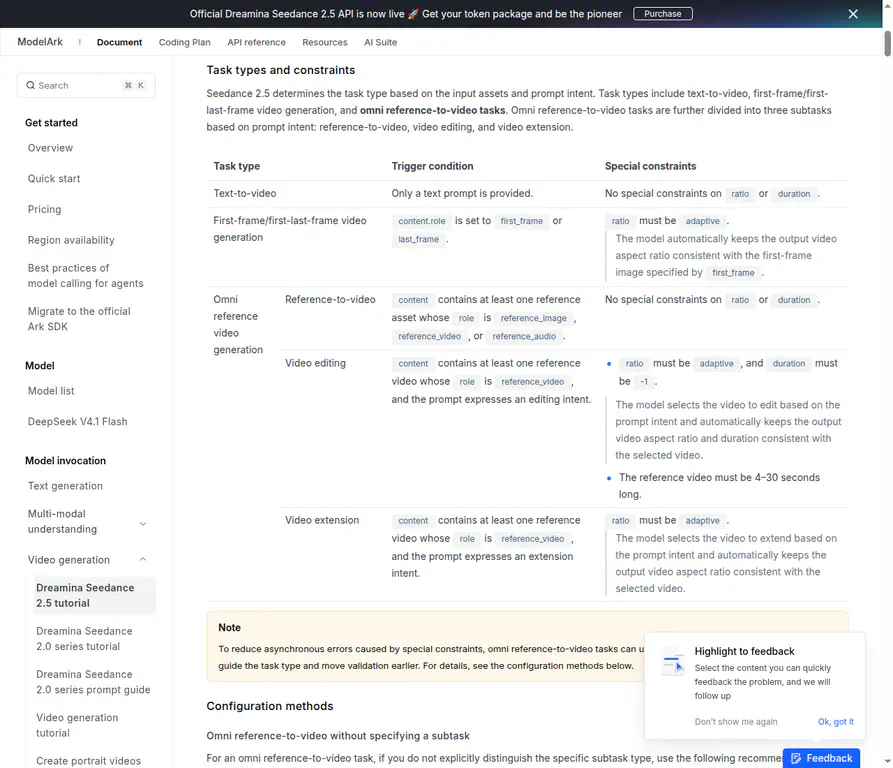
Replacing performers in an existing clip has different constraints from generating a new video using references.
For a vertical edit, prepare a vertical source video. Writing “9:16” in the prompt is not a substitute for the required ratio: "adaptive" setting. Similarly, editing a short source does not become a 21-second performance just because the prompt requests 21 seconds. Choose a source segment whose length and framing fit your intended result.
For reference-to-video generation, rather than editing, the model’s supported output duration is 4–30 seconds, and its aspect-ratio options include 9:16. However, the prompt must describe a new generation using references, not silently switch to replacing an existing video. If you leave the subtask on automatic inference, the official guide recommends ratio: "adaptive" and duration: -1 to accommodate task-specific constraints.
The model still checks whether the prompt intent matches the requested task. Explicitly selecting an edit mode does not make an unrelated generation prompt an editing prompt.
Important for human portraits: the direct BytePlus workflow does not support ordinary uploads of reference images or videos containing real human faces. Use the documented portrait-asset options, including the authorized real-person route, instead of assuming that consent alone makes a raw face-image URL acceptable to the API. Do not assume every third-party frontend exposes that same access workflow.
Runway Gen-4.5: configure a short image-to-video variation
The official Gen-4.5 configuration guide lists text-to-video and image-to-video inputs. Its image-to-video mode is not the same two-identity-images-plus-dance-video workflow used by the published reference prompts.
For Prompt 4, use these settings as a practical starting point:
| Setting | Starting choice | Documented capability |
|---|---|---|
| Mode | Image to Video | Text plus one starting image |
| Starting image | Both characters in one clear composition | Establishes the first frame and visual scene |
| Duration | 10 seconds for the fuller sequence; 5 seconds for a simpler first interaction | Supported range is 2–10 seconds |
| Aspect ratio | 9:16 | Image-to-video supports 720 × 1280 vertical output |
| Resolution | 720p | Listed native output resolution |
| Frame rate | 24fps | The guide lists 24fps and 25fps |
| Text emphasis | Motion, sequence, and camera behavior | The image already supplies the visual starting point |
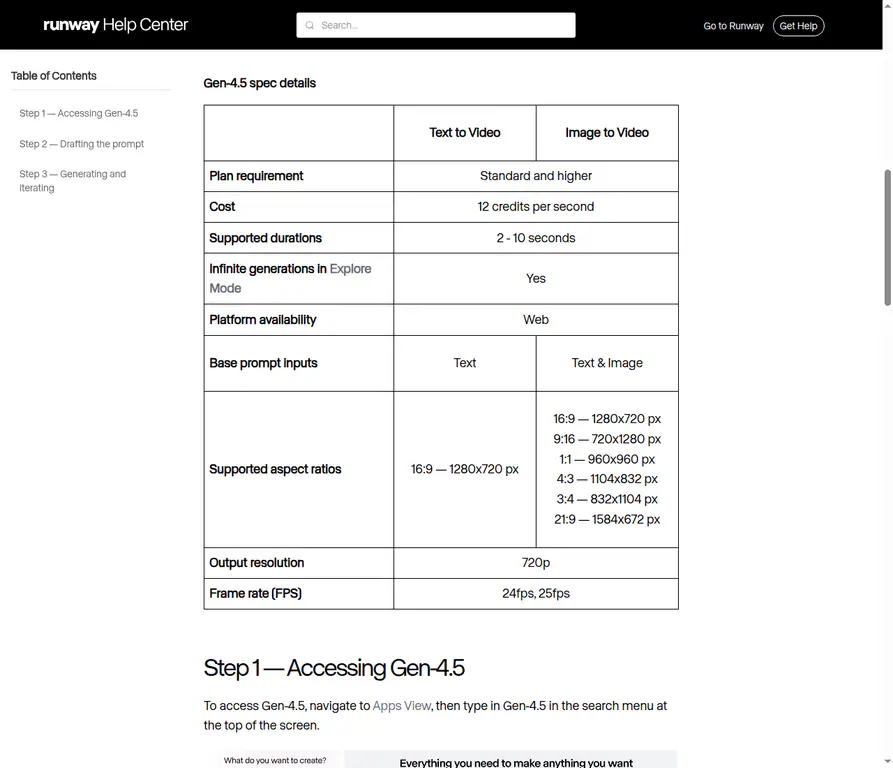
Check the image-to-video column: the documented aspect ratios differ from the text-to-video column.
The current specification table lists 9:16 under Image to Video, while its Text to Video column lists 16:9. Do not choose text-only generation and assume that adding “vertical” to the prompt unlocks the same output settings.
Runway’s current image-to-video prompting guide is optimized for Gen-4.5. It recommends focusing on motion and allows sequential descriptions or rough timestamps. The starting image supplies composition, subjects, lighting, and style.
That is why Prompt 4 describes the characters’ actions instead of repeating a long inventory of their fur, clothing, and background. Identify the subjects clearly, then explain the motion.
If you need a longer sequence, the guide describes extracting the last frame of a completed clip and using it as the next starting image. You can combine the clips afterward. This is a continuation workflow, not proof that separate clips will match an original dance reference or maintain perfect identity at the join.
Effect comparison: what actually changes between workflows?
The most useful comparison is not “which model is best?” It is whether the chosen input can carry the information your video needs.
| Visual goal | Image-to-video with a motion prompt | Video edit or reference-based remix | Fixed Smalltown Boy preset |
|---|---|---|---|
| Recognizable starting characters | Comes from the composed starting image | Comes from assigned identity assets | Comes from the uploaded duo photo or portraits |
| First close-up and role switch | Described in text; the model invents the execution | Supplied by the source sequence, with assignments explained in text | Built into the preset routine |
| Matching camera cuts and timing | Not supplied by a source video | Can be requested from the reference; needs review | Preset-directed, with AI variation |
| Custom choreography | Described as a new sequence | Change or replace the reference, or define a different task | Not exposed as a custom prompt control |
| Main check | Whether the requested sequence happened | Whether performer assignments and motion survived the remix | Whether both uploaded characters remain recognizable |
This is a comparison of workflow control, not a measured ranking of output quality. More inputs or higher resolution do not establish better faces, cleaner hands, or a higher success rate.
A published example shows the sequence—not a model benchmark
The demonstration below shows the foreground/background structure: one adult takes a close-up with hands beside the head, the roles switch, and the pair then dance together against the same wooden-fence setting.
Watch the first foreground performer, the second close-up, and the shared dance as three separate identity checks.
In this published clip, the first foreground performer wears a dark top, a necklace, and light blue jeans; the second wears a dark jacket over a pink top. Those visible differences make it easier to track the performers through the switch and into the shared shot. The approximate sequence is the first close-up in the opening six seconds, the second around seconds seven to thirteen, and the shared dance afterward.
The clip illustrates the choreography readers are trying to preserve. It does not establish which of the prompts above produced it, which model was used, or how many attempts were needed. A convincing selected demo is not a success-rate measurement.
How to compare your own prompt versions fairly
Keep the source images, reference segment, model version, task mode, duration, resolution, and audio treatment unchanged. If the interface exposes a seed, record it and keep it fixed where possible. Then change one prompt element—for example, performer-based identity binding instead of repeated left/right instructions.
Review the variants against four questions:
- Identity: does each character keep its face, outfit, or coat markings after the role switch?
- Sequence: does the first performer take the intended close-up before the second gets theirs?
- Motion: do the gestures and timing follow the selected reference, or drift into a different dance?
- Anatomy and framing: do hands or paws remain distinct, and do both bodies fit the shared shot?
Write down the moment of failure, not just “Version B looks better.” “Cat A’s white chest marking transfers to Cat B after the switch” tells you what to investigate. “The ending crops out the second dancer” points to a framing problem rather than an identity prompt problem.
Try more than one output per version before deciding that a wording change reliably helps. Different generated samples can vary even when the instructions stay the same.
How to fix the most common prompt problems
The characters swap identities when they swap places
Bind each image to a source performer for the whole clip. Avoid repeatedly assigning identity by current screen position. For a foreground/background opening, use “first close-up performer” and “initial background performer” instead of guessing left and right.
Also check that the files were actually attached to the expected slots. A precise prompt with reversed images still produces the wrong assignment.
The pets acquire human hands or lose their markings
Use species-specific anatomy descriptions and identify the features that matter. For a cat, that might be its ear shape, white chest patch, and striped tail. For a dog, specify its muzzle, ear shape, and coat pattern.
These are guidance, not hard constraints. If an issue persists, try a clearer identity image or a reference with less occlusion and a simpler interaction. Do not assume an increasingly long list of prohibitions will fix a difficult movement.
The dance becomes generic
Check the input mode before rewriting the prompt. A model given only a starting image and the song’s name has no actual dance clip to follow.
For a closer recreation, choose a supported reference or editing workflow and supply the permitted motion asset. For a text-guided variation, describe the visible actions and accept that the choreography is newly generated.
The model ignores the second half of the sequence
Reduce the number of actions or allow a longer supported duration. For a short image-to-video attempt, the first close-up and background sway may be enough to test. Add the swap only after you have a workable opening.
For an edit, trim the reference to a manageable segment before generation rather than asking a short source to contain a much longer performance.
The API rejects an otherwise sensible prompt
Check task-type constraints, asset roles, file requirements, and portrait restrictions. A replacement edit with a fixed duration: 10 is not equivalent to the required duration: -1. Two images assigned as first_frame and last_frame are not two identity references.
Resolve the request mismatch before spending time on adjectives such as “cinematic” or “ultra realistic.”
If you just want the finished trend, you do not need a prompt
The manual workflows above are useful when you want to experiment with reference clips, task types, or custom motion. If your goal is simply to put a recognizable duo into the established routine, Smalltown Boy AI provides a preset photo-to-video workflow instead.
Upload two separate portraits or one clear photo containing both characters. With two portraits, Photo A takes the first screaming close-up and Photo B starts in the background. With a duo photo, the left subject gets the first role and the right subject gets the second.
The standard video is 21 seconds, 720p, and vertical 9:16, with a fixed soundtrack. You do not paste any of the prompts above into this generator, upload a reference clip, or select the underlying model’s full API settings. The preset handles the routine.
Preview both characters through the close-ups, role switch, and shared dance before downloading. Clear photos are a better starting point, but exact likeness, clothing, pet markings, anatomy, and choreography are not guaranteed. Standard generation uses 10 credits; check the displayed balance and cost before submitting.
Smalltown Boy AI prompt FAQ
Is there one universal Smalltown Boy AI prompt?
No. A reference edit, a reference-guided new generation, and an image-to-video variation need different inputs and may require different settings. A prompt is useful only when its instructions match the selected mode.
Does writing “SAME IDENTITY” lock the characters?
No. It expresses an instruction. Attach clear identity references, define performer assignments, and inspect the output. Uppercase wording does not create a guaranteed identity-lock feature.
Should I use a negative prompt?
Do not assume every model has a separate negative-prompt field. The published examples include exclusions in the main prompt, but that does not make negative_prompt a universal API parameter. When adapting them, keep the main request clear: two distinct characters, coherent anatomy, and stable performer assignments.
Will the prompt include the original Smalltown Boy song?
A motion prompt is not an audio file or a music license. Audio support depends on the workflow. Handle the soundtrack through a permitted audio source or publishing platform, and check the rights for your intended use. The fixed generator includes its own set soundtrack; that does not establish unrestricted music rights everywhere.
Can I use photos of friends?
Use consenting adults and follow the selected provider’s portrait rules. Direct BytePlus reference access has its own portrait-asset process; another frontend may offer a different workflow. Permission to use a person’s photo does not override the provider’s input restrictions or a publishing platform’s AI-content rules.
Will 1080p fix faces, paws, or the choreography?
Higher resolution is not an anatomy repair tool. First fix the inputs, assignments, and motion request. Seedance 2.5 supports 1080p output, but its documentation also notes HEVC/10-bit playback considerations. Gen-4.5’s listed native video output here is 720p; do not promise native 1080p because an upscale option exists.
Choose the input that carries the movement
For a close reference remix, assign two identities to two performers and let the permitted video carry the action sequence. For a new variation, use a clear starting composition and a manageable motion prompt. For the fixed preset, skip prompt writing entirely. In every case, the useful result is the one that keeps both characters recognizable through the switch—not simply the one generated from the longest prompt.