

Best Photos for Smalltown Boy AI Dance
Choose the best photos for Smalltown Boy AI dance: compare two portraits with one duo photo, match crops and lighting, and set the opening role.
A funny Smalltown Boy AI dance starts before the first scream, the role swap, or the final rush toward the camera. It starts with a simple question: do your photos give the generator two characters it can actually keep apart?
The most successful uploads are not necessarily the most polished pictures in your gallery. They are the photos that make identity, scale, and the intended duo obvious. When one input is a bright, front-facing portrait and the other is a dark, distant group shot, the generator has to solve an avoidable puzzle before it can stage the dance.
This guide is about that pre-upload decision. It will help you choose between two portraits and one shared duo photo, match the pair, assign the opening role, and spot the source-photo problems that commonly show up as a strange result later.
Quick answer: the best photos for Smalltown Boy AI dance
For the strongest result, use two clear, well-lit images with one recognizable subject in each, or one clean photo containing exactly two recognizable subjects. Faces should be visible, upper bodies should be easy to read, and both characters should occupy a similar amount of the frame.
If you are uploading separate portraits, choose a near-front-facing image for each character. Keep both eyes, the full face, and the shoulders visible. Then crop the pictures so the heads sit at a similar height and neither dancer starts as a tiny background detail.
If you are uploading one duo photo, keep both people, pets, or characters inside the crop. Neither subject should be hidden, half out of frame, much smaller than the other, or confused with an extra face in the background.
The goal is not to make the two subjects look the same. A serious friend and a chaotic friend, a cat and a dog, or two visually different characters can make the role swap funnier. The goal is to make the input quality equally clear for both sides of the duo.
Choose the right input format first: two portraits or one duo photo?
Smalltown Boy AI accepts either two separate portraits or one photo with both characters. Neither option is universally better; they solve different problems.
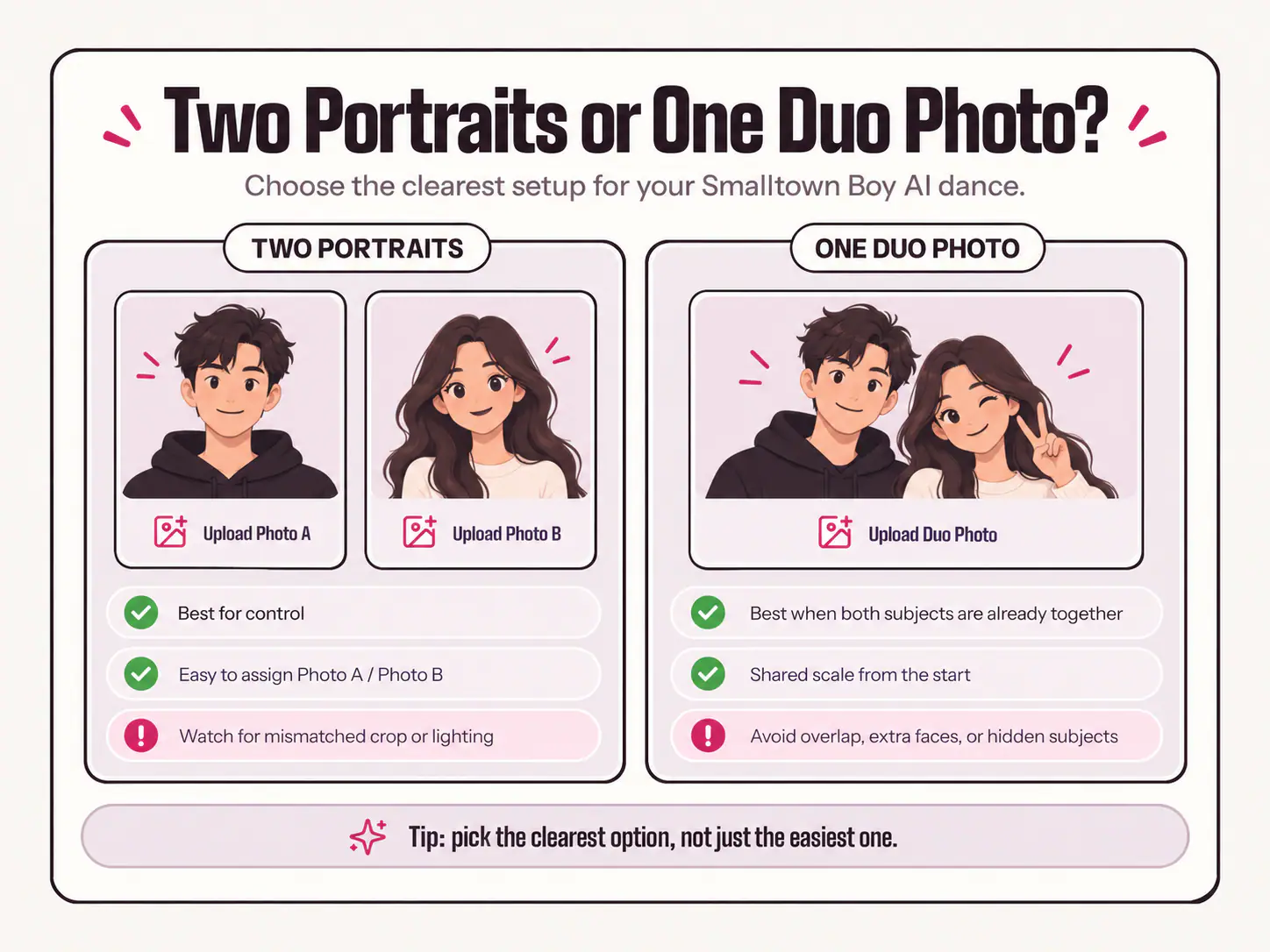
| Choose this setup | It is best when | Main advantage | Main risk |
|---|---|---|---|
| Two separate portraits | The two subjects were photographed separately, or you want precise control over who opens the video | You can select and crop each identity independently | Mismatched camera distance, crop, or lighting can make the pair feel uneven |
| One duo photo | The subjects are already clearly visible together, at a similar scale | Their shared scene and relative size are established from the start | Overlap, extra faces, or one hidden subject can make the relationship ambiguous |
Use two portraits when you want to pair people who were never in the same picture, when one subject needs a better crop, or when the opening role is part of the joke. This is the more forgiving setup when you have good individual photos but no clean photo together.
Use one duo photo when both characters are already easy to see in the same frame. A well-composed photo of two friends on a sofa, two pets facing the camera, or two original characters standing side by side gives the generator a ready-made relationship. It also avoids the task of reconciling radically different locations or camera lenses.
Do not choose a duo photo just because it is convenient. A shared photo is the wrong input when one person is behind the other, a third person is visible nearby, a pet is half under a blanket, or the subjects are at very different depths. In those cases, separate portraits give each performer a clearer starting point.
Treat each upload like a casting card, not a social post
A social photo can succeed because the people in it remember the moment. An AI dance input needs to succeed because the visual information is legible without that backstory.
Open a candidate photo at ordinary phone-screen size. Ask yourself: if someone had never met this person or pet, could they immediately identify the intended subject? If the answer depends on zooming in, remembering what they wore that day, or explaining which face is yours, choose a different image.
A useful casting-card photo answers four things at once:
- Who is this? The face, hairstyle, coat pattern, or character design is visible.
- Where is the face? The eyes, mouth, and outline are not hidden by glare, hair, hands, a phone, or another subject.
- How big is the performer? The frame shows enough head and upper body to establish scale.
- What makes this subject distinct? A hairstyle, glasses that do not hide the eyes, clothing colour, ear shape, muzzle, or markings gives the generator and the viewer a stable reference.
This does not mean every source photo must look formal. A spontaneous photo can be excellent if the identity information is clean. The practical issue is visibility, not whether the pose feels posed.
Smalltown Boy AI photo tips: match the pair on the things the camera can see
With two portraits, the best photos for Smalltown Boy AI are usually a compatible pair rather than two individually perfect pictures. Compare them before upload.
Match subject scale
Look at how much of each crop is occupied by the face and shoulders. A tight selfie next to a full-body photo taken from across a park creates a large scale gap. The preset may still generate a result, but the two performers start from very different visual instructions.
Re-crop the wider image when it has enough detail to support the change. If the face becomes soft or tiny after cropping, replace the photo rather than forcing it. The fix is not to crop the good portrait until it is equally bad.
Match head height
The heads do not need to be perfectly aligned, but they should live in a similar part of each input frame. If one subject’s forehead touches the top edge and the other appears low with empty space above, the pair can begin with a mismatched visual rhythm.
Give both subjects a little room above the head and keep the shoulders in a similar lower area of the frame. This is more useful than mechanically making every crop identical.
Match viewing angle
A slight turn is natural. A hard side profile, extreme high-angle selfie, or photo shot from below is a less reliable companion for a mostly front-facing portrait. The generator has fewer visible facial cues to work with when one eye, the jawline, or the far side of the face disappears.
For a two-photo AI dance, choose near-front-facing images whenever you have the option. Save the dramatic profile shot for a post or cover image; use the clearer portrait to define the performer.
Match usable lighting—not the background
The two inputs do not need matching rooms, weather, or colour palettes. One person can be indoors and the other outdoors. What matters is whether the face and upper body are readable in both.
Favour even light over dramatic light. Direct sun through half a face, deep club lighting, bright backlight from a window, or heavy coloured LEDs can remove detail that a normal viewer mentally fills in. A generator cannot reliably recover features that the original image does not show.
Build a crop for the scream, the swap, and the shared dance
The Smalltown Boy routine moves through close-ups, background movement, a role switch, and a shared finale. Your input does not need to show every future pose, but it should contain enough reference information to survive those changes.
A practical crop usually includes:
- The full face, including both eyes and the mouth.
- The hairline, hair, ears, or other outline that makes the character recognizable.
- Shoulders and some visible upper-body detail.
- Clothing, fur, or a character costume where it helps distinguish the subject.
- A clean border around the head rather than an abrupt crop through the forehead, ears, or chin.
A face-only crop can be tempting because the first close-up is dramatic. It is not always the best all-purpose input. The shared-dance section has to infer more of the body, so an image with visible shoulders and torso gives the system a more useful starting point.
The opposite extreme can also hurt. A distant full-body image may show every limb but leave the face too small to preserve identity through the close-up. For this format, a clear head-and-upper-body photo is usually the best compromise. If you only have a full-body photo, crop it only as far as the image stays sharp.
Remove visual obstacles before you blame the generation
Most avoidable source-photo issues fall into a small number of patterns.
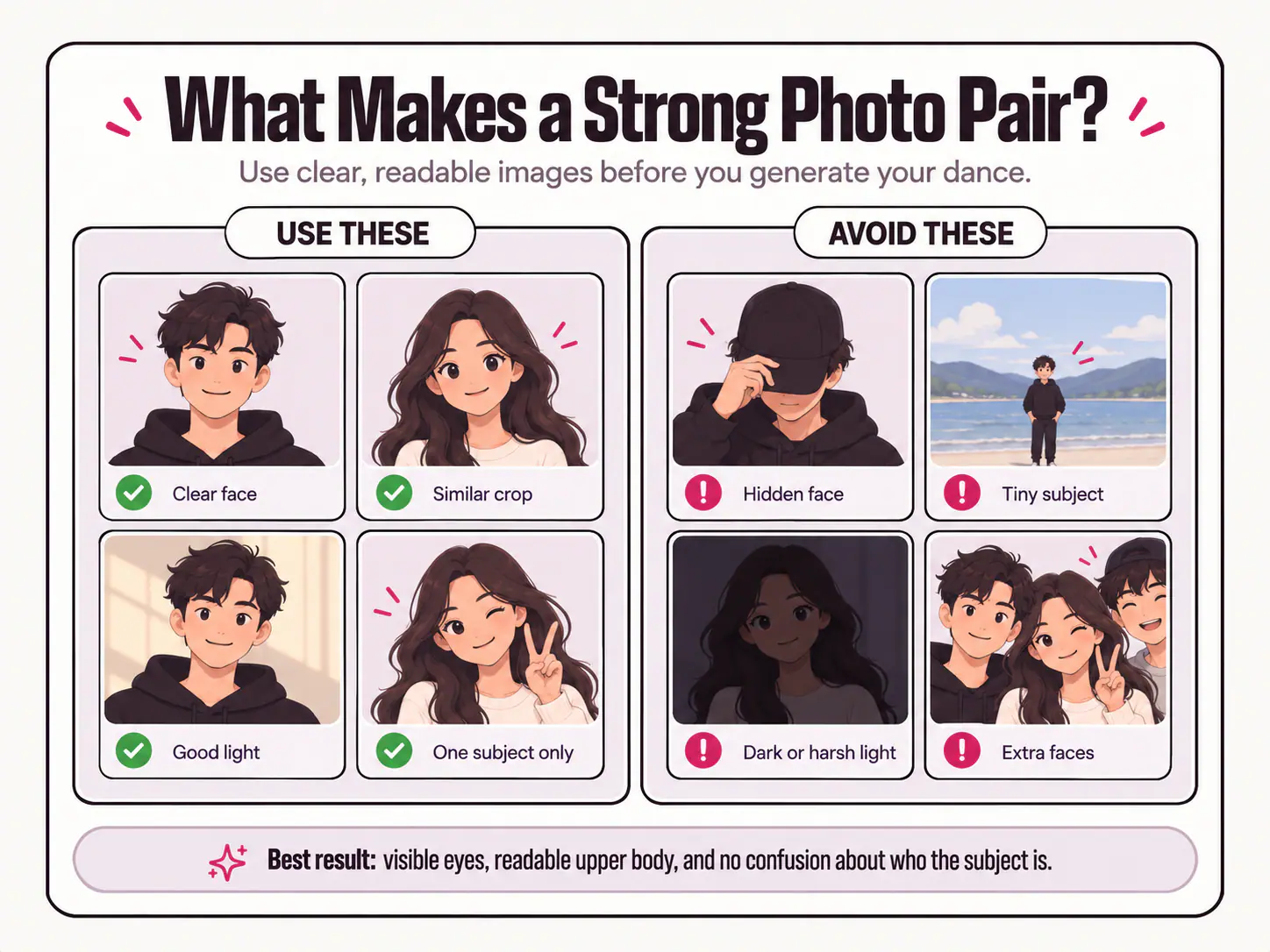
| Input problem | Why it weakens a dance reference | Better alternative |
|---|---|---|
| Sunglasses or dark tinted lenses | The eyes and eye shape are hidden during an expression-heavy routine | Use a photo with visible eyes and natural catchlights |
| Hands, phones, hair, or props across the face | The face outline and mouth are partially missing | Choose a frame where the face is clear, even if the pose is less dramatic |
| Heavy beauty filters or stylised face effects | Details may be smoothed, altered, or inconsistent | Start with the original camera image or a light edit |
| A screenshot, repost, or tiny thumbnail | Compression removes fine facial, fur, and clothing detail | Upload the original file when you have it |
| Several people in one portrait | The intended performer is unclear | Crop to one complete subject or use a clean solo photo |
| Busy background faces, mirrors, or posters | Extra face-like shapes compete with the real subject | Choose a simpler photo or crop tighter around the intended person |
| One subject in deep shadow | The model receives fewer facial and body cues from that side | Use a brighter image where the face separates from the background |
Do not try to repair every issue with aggressive editing. Sharpening, enlarging, or brightening a tiny screenshot can make artifacts more obvious. A different original is usually more valuable than a heavily processed rescue attempt.
Make the opening role intentional
The preset uses an ordered handoff: one character gets the first screaming close-up while the other begins in the background; then the roles switch. That order is part of the comedy, so set it before you generate.
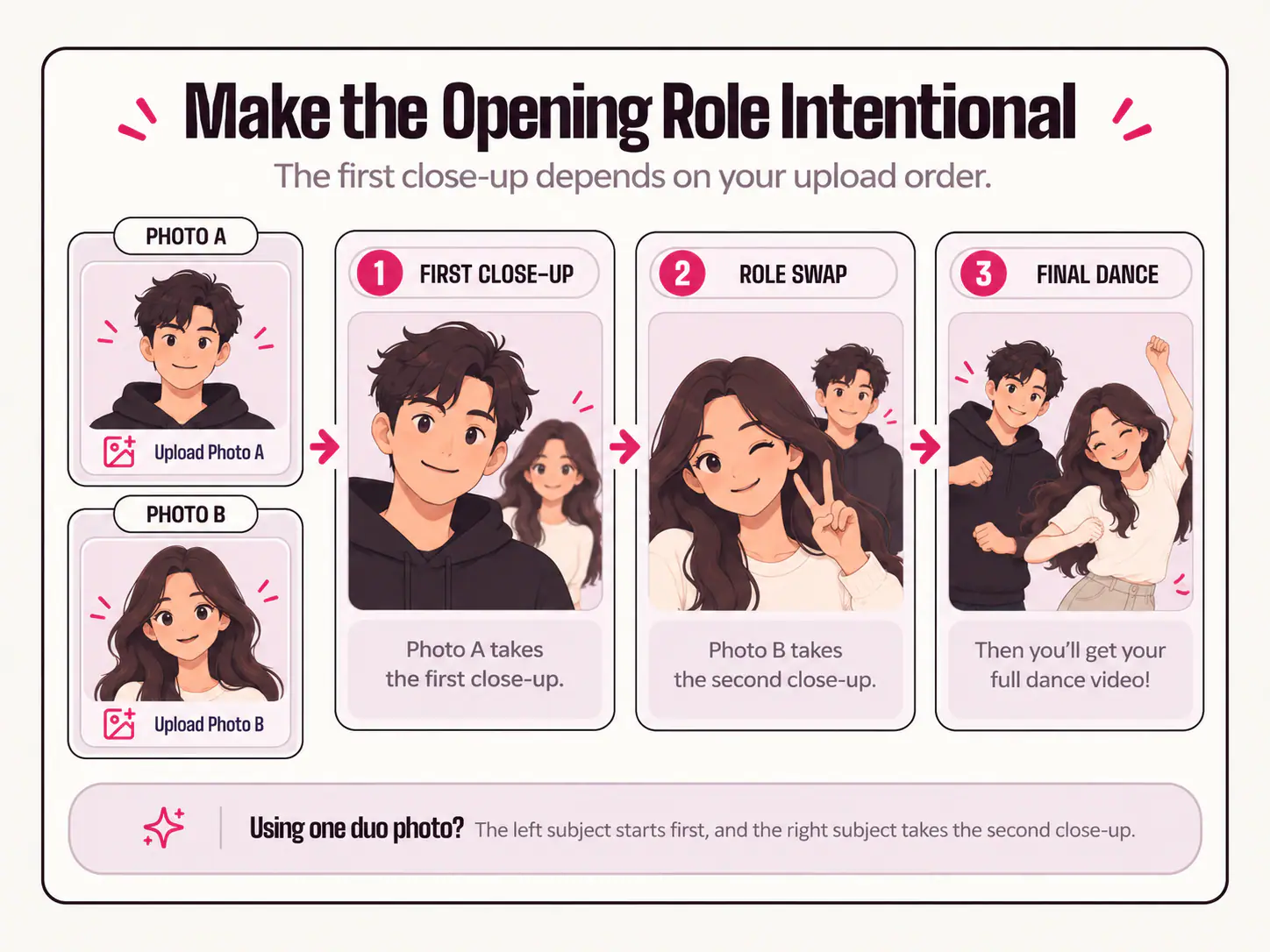
With two separate portraits, Photo A is the first close-up character. Photo B starts behind, then gets the spotlight after the swap. Give the opening role to the subject whose expression, personality, or relationship to the caption makes the first reveal land. This might be the birthday person, the cat with the most theatrical face, or the friend everyone expects to be the loud one.
With one duo photo, the left subject takes the first role and the right subject takes the second. Check the preview after cropping. A photo that looked balanced in your gallery may become lopsided if a crop moves one face toward the edge.
File names can help when you are using separate portraits. Save copies as photo-a-first-closeup and photo-b-second-closeup before you begin. This sounds minor, but it prevents the most frustrating kind of remake: a technically good video where the right character appears first and the joke loses its point.
Do not confuse contrast with incompatibility
The most memorable pairings usually have contrast. A deadpan person beside an expressive friend, a neat white cat beside a shaggy brown dog, or two characters from opposite visual worlds all create an immediate premise.
Keep the contrast in the idea, not in the source quality. A clean portrait of a cat and a clean portrait of a dog can work together well. A crisp cat close-up and a muddy dog silhouette from fifty metres away cannot.
For people, contrast can come from expression, hairstyle, age-appropriate wardrobe, or the audience’s existing knowledge of the pair. It does not require a strange camera angle or a dramatic filter. For original characters, use images in a compatible rendering style when possible; a flat icon paired with a photorealistic face may be intentionally surreal, but it gives the generator less common visual ground.
A special checklist for cats, dogs, and other pets
Pet videos are funniest when viewers can still tell whose pet is taking the close-up after the role switch. Human viewers may recognize a cat from its attitude. A generator needs visible details.
For each pet, look for a photo showing the face, eyes, ears, muzzle or beak, coat colour or markings, and enough chest or body shape to distinguish it from its partner. Natural light is helpful because dark fur, black ears, or fine stripes can disappear in a dim room.
If the two pets look alike, do not avoid the idea—just choose smarter references. One tabby may need a photo that clearly shows the forehead stripes and white paws; the other may need a shot that shows its different muzzle, eye colour, or chest patch. Give each animal room in the crop. Do not use a photo where their faces overlap and expect the role swap to make the identities clearer later.
For a cat-specific version of the preset, the Smalltown Boy cat dance generator uses the same photo-order logic while focusing on the visible features that make each cat recognizable.
Use a 20-second pair test before you spend a generation
Put the two source images side by side, either in your gallery or in the upload preview. Then run this fast test:
- Recognition: Can you identify each subject instantly at ordinary screen size?
- Face: Are both eyes, the mouth, and the face outline visible?
- Body: Are shoulders or a clear upper body visible for both subjects?
- Scale: Are the faces roughly comparable in size after cropping?
- Separation: Does each image show one intended subject, with no competing faces or overlapping bodies?
- Order: Do you know who should get the first close-up?
- Permission: Do you own the images or have the pictured people’s approval to create and share an AI performance?
If a photo fails one test, change that input before changing everything else. The process works best when you can tell which improvement helped.
When the first result is off, diagnose the source pair
Even excellent photos cannot remove all generative variation. The useful response is to look for the specific mismatch rather than assume a second attempt will fix itself.
| What you notice in the finished clip | Most likely photo-pair issue | First change to make |
|---|---|---|
| The wrong person appears to take the first close-up | The order or left/right position was not checked | Re-upload in the intended A/B order, or use a duo crop with the intended lead on the left |
| One character looks much bigger than the other | The source photos use very different camera distance or crop scale | Re-crop the wider image, or replace it with an upper-body portrait |
| A face changes during a close-up | The input was blurred, angled, obstructed, or over-filtered | Use a sharper, near-front-facing original |
| Two faces seem to merge or a person disappears | A duo photo had overlap, extra subjects, or crowded background faces | Switch to two separate portraits, one clear subject per file |
| A pet loses stripes, patches, or ear shape | Low light or compression hid the distinguishing details | Use a brighter original that clearly shows the face and coat |
| Clothes change in the output | Wardrobe information was limited, or the model varied it | Choose a photo where the outfit is clearly visible, but do not promise exact garment reproduction |
Change one thing at a time. If you replace both photos, reverse the order, and alter the crop in one retry, you cannot learn which decision improved the result. Keep the stronger input, repair the weaker one, and use the next output as a focused comparison.
Choose photos with permission and privacy in mind
A familiar face is what makes this meme personal, but it is also personal data. Ask before uploading a friend, partner, sibling, or any other identifiable adult, and let them see the finished clip before you post it publicly. Do not use confidential images, official IDs, medical photos, or pictures that could expose someone to harm or embarrassment.
Smalltown Boy AI processes uploaded photos and cropped versions to generate the video and maintain account history; the service’s Privacy Policy explains that processing can involve third-party AI and content-safety providers. Use photos you have the right to submit, and treat a generated dance as an AI performance—not evidence that the person actually did, said, or endorsed anything.
Your best photo pair is the one that removes the guesswork
A great Smalltown Boy AI dance does not require professional lighting or matching outfits. It requires two subjects the generator can see, distinguish, and place in a clear opening order.
Choose two portraits with readable faces and upper bodies, make the crops compatible, and decide who owns the first close-up. Or use one duo photo only when both subjects are fully visible and clearly separated. Once the pair passes that check, the preset can focus on what it is designed to do: the scream, the swap, and the final shared dance.
When your images are ready, open the Smalltown Boy AI dance generator to set the order, preview the crop, and create the duo video.
Frequently asked questions
Do the two photos need to be taken at the same time?
No. Two separate portraits can work very well, even when they were taken in different places. Match their crop scale, head height, viewing angle, and usable lighting before upload. The photos do not need the same background or the same outfit.
Is one duo photo better than two portraits?
It is better only when the shared photo already shows exactly two clear subjects at a similar scale. Use two portraits when a duo photo contains overlap, extra people, a hidden face, or a weak crop for one character.
Should I use a close-up or a full-body photo?
For this preset, a clear head-and-upper-body photo is usually the most useful compromise. It gives the close-up a readable face while supplying some body and clothing reference for the shared dance. Avoid both an extreme face-only crop and a very distant full-body shot when you have a stronger alternative.
Can I use the same person in both photo slots?
You can create a double-character concept when the result and sharing context are appropriate. Use two distinct, clear images with comparable framing, then choose the opening role deliberately. Do not use two nearly identical, low-detail frames that make the two roles hard to distinguish.
Why did the output change the clothing or small facial details?
The source photo gives the model a reference, but generated likeness, clothing, motion, and anatomy can vary. Start with a clear image where the details matter, review the full video, and do not use a generative clip where exact wardrobe, logos, or identity fidelity is a non-negotiable requirement.